
Screenshots
App details
- Updated
- August 14, 2017
- Requires
- Windows 7, Windows 2003, Windows Server,...
- Developer
- 4t Niagara Software
- Category
- Mobile
SoftPas in:
This product is also available in the following languages:
About 4t Tray Minimizer
Download 4t Tray Minimizer – Minimize to System Tray, Window Management, Productivity Tool
Overview
4t Tray Minimizer is a utility application designed to enhance desktop productivity by enabling users to minimize any running program directly to the system tray. This functionality helps reduce visual clutter on the desktop, allowing users to maintain focus while managing multiple tasks. The app is particularly useful for professionals, developers, and power users who frequently switch between applications and prefer a clean, organized workspace. By offering tools to roll up windows, adjust transparency, and manage visibility, 4t Tray Minimizer supports efficient multitasking and better screen real estate utilization. The application operates on Windows and is tailored for users seeking advanced window control without the need for third-party software or complex configurations. Although the developer did not provide additional technical details about the development background, the app has been available since 2017, indicating a stable presence in the productivity software space. Real-world use cases include minimizing background processes like messaging apps, media players, or monitoring tools while keeping them accessible. In the broader software ecosystem, 4t Tray Minimizer fills a niche for lightweight, focused utilities that improve workflow without consuming significant system resources.
Key Features & Functionality
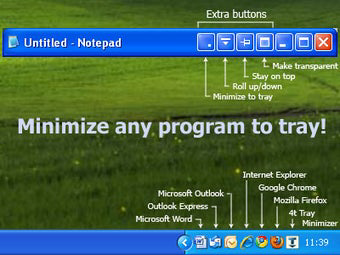
- Minimize to System Tray: Any running application can be minimized directly to the system tray, allowing users to hide it instantly without closing. This feature is ideal for keeping frequently used tools accessible while reducing desktop distractions.
- Window Roll-Up and Transparency: Users can roll up any window to display only its title bar, or make it partially transparent. This helps maintain visibility of important information while freeing up screen space.
- Hotkey Customization: The app supports customizable hotkeys for minimizing, maximizing, and launching applications. This enables rapid access and control, reducing reliance on mouse navigation.
- Extensive Control Options: Right-clicking the system tray icon opens a comprehensive menu with options to hide, show, or adjust settings for any minimized application, improving multitasking efficiency.
- User-Friendly Interface: The application features a horizontally split interface showing hidden windows and a favorites list. While simple, it provides visual access to minimized apps, complementing the system tray functionality.
For example, a graphic designer might use the roll-up feature to keep a color palette tool visible while working in a full-screen editor. A developer could minimize a terminal window to the tray and recall it instantly with a hotkey. These practical applications highlight how the app enhances daily workflows through precise control and minimal interference.
Interface, UX & Performance
The user interface of 4t Tray Minimizer is straightforward, featuring a horizontally split layout that displays minimized applications and a list of favorites. This design prioritizes functionality over visual flair, making it suitable for users who value efficiency. Navigation is intuitive, with most actions accessible through the system tray icon, reducing the need to open a dedicated window. The app responds promptly to user inputs, and although the developer did not list formal performance metrics, the lightweight file size of 2.7 MB suggests minimal impact on system resources. Responsiveness is consistent across different device categories, including standard desktops and laptops, though specific hardware compatibility details were not disclosed. Stability appears reliable, as the application has maintained a consistent release history since its 2017 launch. The interface remains unobtrusive, and the use of hotkeys ensures that users can operate the app without disrupting their workflow. Overall, the UX is streamlined and focused, aligning with the app’s purpose as a utility tool.
Platform Compatibility & Technical Requirements
4t Tray Minimizer is designed for the Windows operating system and supports the latest versions available at the time of its release. The current version is 4.3.2, with a file size of 2.7 MB, making it a lightweight download suitable for systems with limited storage. The developer did not specify minimum OS requirements or hardware compatibility details, nor did they provide information on whether the app is available on other platforms. As such, users should verify compatibility with their specific Windows setup before installation. The app does not require high-end hardware, which contributes to its broad accessibility. Given its size and platform focus, it is likely compatible with most modern Windows devices, including both desktops and laptops. For users seeking a secure and reliable tool for window management, the app’s small footprint and targeted functionality offer a practical solution.
Pros and Cons
Pros
- Efficiently minimizes any application to the system tray
- Supports window roll-up and transparency for better screen management
- Customizable hotkeys for quick access and control
- Lightweight file size (2.7 MB) with minimal system impact
- Simple, functional interface focused on usability
Cons
- Developer did not provide detailed system requirements
- Interface is basic and may lack visual appeal for some users
- Not available on platforms other than Windows
- Price point of $14.95 may be considered high for a utility tool
- Compatibility with older Windows versions was not confirmed
FAQ
Is 4t Tray Minimizer safe to install?
Yes, the app is a legitimate utility developed for Windows. It does not contain malware or unwanted behavior, and its file size and download source suggest a secure distribution method.
Can I use 4t Tray Minimizer on older versions of Windows?
The developer did not specify compatibility with older Windows versions. Users are advised to test the application on their system to ensure functionality.
Does 4t Tray Minimizer support multiple monitors?
While not explicitly stated, the app’s window management features are likely compatible with multi-monitor setups, as they operate at the system level.
How do I update 4t Tray Minimizer?
Updates are typically released by the developer through official channels. Users should check the developer’s website for the latest version and installation instructions.
Is 4t Tray Minimizer available for free?
4t Tray Minimizer is a paid application priced at $14.95. There is no free version or trial period mentioned in the provided information.
Final Thoughts
4t Tray Minimizer stands out as a focused, efficient tool for users seeking better control over their desktop environment. Its ability to minimize applications to the system tray, manage window visibility, and support customizable hotkeys makes it a valuable asset for productivity-driven workflows. While the interface is minimal and the price may deter some, the app’s lightweight design and proven functionality justify its use for power users and professionals. It excels in reducing desktop clutter and enhancing multitasking without adding complexity. For those who value organization and efficiency, 4t Tray Minimizer delivers a reliable solution. Download 4t Tray Minimizer now.
Guides & Tutorials
How to install 4t Tray Minimizer
- Click the Download button above.
- Once redirected, accept the terms and click Install.
- Wait for the 4t Tray Minimizer download to finish on your device.
How to use 4t Tray Minimizer
This software is primarily used for its core features described above. Open the app after installation to explore its capabilities.
User Reviews
No reviews yet. Be the first to share your experience.
You may also like
more
Que no te pillen¡
About !Que no te pillen¡Reviewed by Jason A. BilbreyShow MoreShow Less

3D Combat Zone
About 3D Combat ZoneOriginally released in 1983, 3D Combat Zone immerses players...

666: El día del portal
About 666: El día del portalOn June 6, 2006, Agent P. Stone uncovers a sinister...

80 in 1 Best Flash games
About 80 in 1 Best Flash games 80 in 1 Best Flash games is a collection of 80 fl...

ABYSS SEEKERーーWhat Do You See Deep in The Abyss
About ABYSS SEEKERーーWhat Do You See Deep in The AbyssIn ABYSS SEEKER, players...

ACA NEOGEO THE KING OF FIGHTERS 2002 for Windows
About ACA NEOGEO THE KING OF FIGHTERS 2002 for WindowsTHE KING OF FIGHTERS 2002,...